
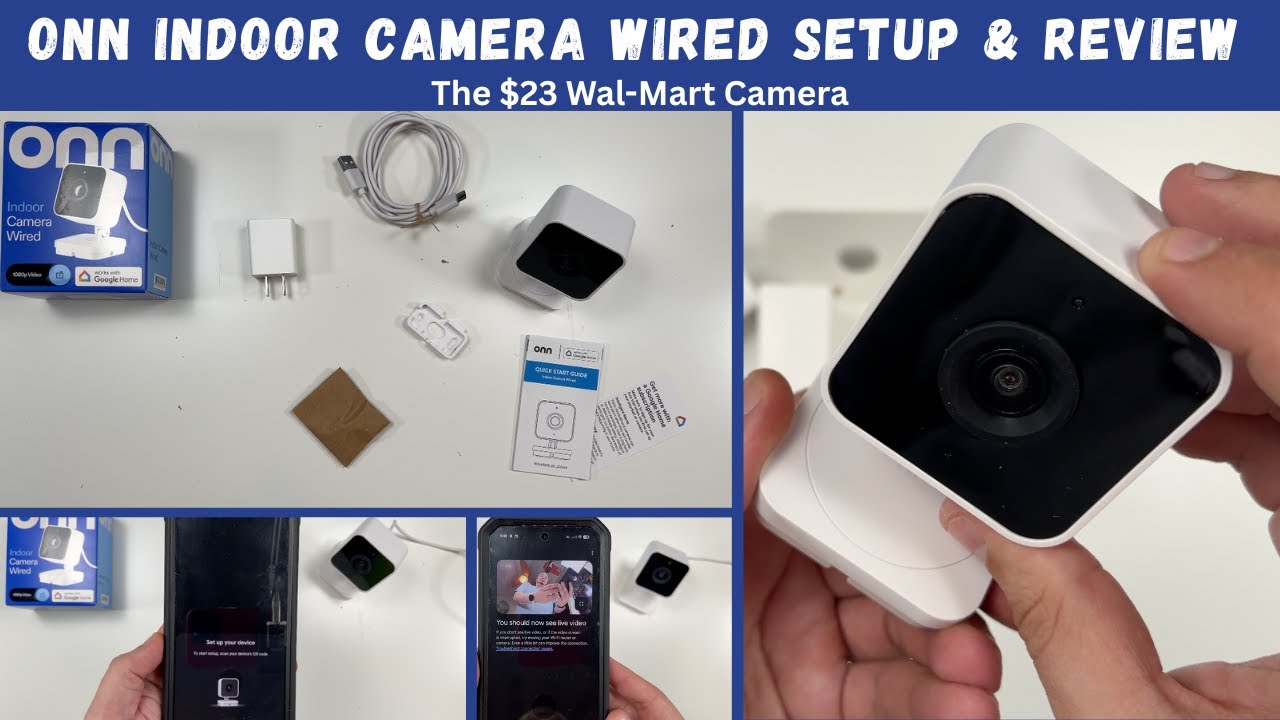
Today I unbox, setup and review the new Onn Indoor Camera Wired. This is a $23 Indoor Wired Security Camera from Onn, Wal-Mart’s brand made with Google. This camera sets up directly in the Google Home App and can use new Google Home Premium Subscription service. See the setup process, the features and how this camera works in my review.
*As an Amazon Associate I earn income from qualifying purchases made by clicking the links in this description.*
Check out my Amazon Store ~ https://www.amazon.com/shop/bigcvlogs
Looking to buy a new Tesla? Use my Tesla Referral code and you could save $500-$1000 off your new Tesla just from buying it after clicking this link ~ https://ts.la/christopher99614
The Equipment I Use Making YouTube Videos:
Recommend Micro SD Card: https://amzn.to/3L4b6kG
Camera: https://amzn.to/3KYDJj8
Editing Desktop: https://amzn.to/3XGwJPx
Editing Laptop: https://amzn.to/3XO3b2a
Vlog Mic: https://amzn.to/3VZtfWP
Overhead Rig: https://amzn.to/45PIKnO
Video Lighting: https://amzn.to/4eEZQZw
Vlog Tripod: https://amzn.to/3VGZrgr
Drone: https://amzn.to/3W0firT
Go Pro: https://amzn.to/3VPxjYK
Tesla FSD Car Mount: https://amzn.to/4cHdLfV
Check out our 2nd YouTube channel with all the product videos you don’t see on this channel ~ https://www.YouTube.com/@BigCInfluencerVideos
Merch: IndulgeClothing.com
Company Website ~ www.BigCVideosLLC.com
Instagram – @BigCVlogs
Twitter – @BigCVlogs
TikTok – @BigCVlogs
Business Inquiries E-Mail ~ CS****@***********LC.com
#OnnCamera #OnnIndoorCamera #OnnIndoorCameraReview



Pretty cool camera
I’ll stick with wyze. Good review by the way
Did the update seem to take forever?
It did take a while for mine too. I think the first update after setup just takes longer because it’s downloading firmware and syncing with Google Home. After that, the smaller updates are much quicker.
$20 and works with my Google Home sub? Totally grabbing this so I can yell at my dog when she gets into my cat’s litter box
The settings page issue has been resolved
So you have to have the Google subscription to watch the video play back ?
@kevinstone4584 Free Tier only supports snapshots. You need subscriptions for video clips
So you have to have Google subscription to watch play back ?
Yes. Standard plan is event history. Advance plan adds 24/7 recording for 10 days plus other stuff. Personally I don’t see the point of event recordings. I think Google Home advance plan is best for people that want lots of cameras that utilize cloud storage.
It’s 10 dollars now for Cyber Monday!
Got mine today! $10 was a steal and got 2.
Bought 3 today! Same day shipping to my house free
Ya I got 2 for $10 each. I did not know about it just being a still image though, and that’s kind of messed up as it was sold as the 3-hour event history.
Bought 2 today
it wont connect to google home without a matter hub if you dont have a nest camera it wont connect
What’s. a matter hub ? Mine won’t work at all
What’s that? Mine will not work!
No, you don’t have to have a matter hun, that just makes setup easier. It will connect to normal wifi. They did drop an update that fixed a few things.
@BigCVlogsmine won’t work with my wifi or Google home
@BigCVlogs without the hub it never connected to my google home so i returned it to the store and customer service at the store said if you would have asked me before you bought it i could have told you that its not gonna connect to your google everyone has been bringing them back with the same issue and they pulled them form the shelves where i live
Am I the only one that Camera keeps saying failed?
Mines too idk how to fix it
@amiyajennette9279same taking it back a waste
Mines is saying the same thing
Guess that makes 4 of us
To resolve, Remove problem device from Google home app first. Next power on the camera, wait for it to boot and do a manual factory reset by pressing the “R” button at the back ..hold for 12s—do not release it until the prompt tone ends. Then wait for it to factory reset and boot. Wait till you see the flashing blue led before attempting to pair again.
I got one. But the video just “spins” when I try to view any event. EDIT: I found out that you cannot watch ‘saved’ videos unless you pay for the Google subscription.. So no wonder they are trying to ‘give’ these away. Nobody wants that !!!!
I have set it up. Is the green light supposed to be solid? Mine goes “in and out” and sometimes, totally “out” even though I check the app and it’s still recording.
This is normal. The status light turns off if you’re not viewing the live stream in the app, the camera detects no activity, or the network is unstable.